Know what the job is costing while you're still shooting it.
The schedule, the crew, the costs, the call sheet and the client in one place. Book crew on WhatsApp and the PO sends itself. Print the call sheet from the same job. Running an event? Send guest passes and scan them at the door.
Twenty minutes, on a real job. No slides.
Book the crew. Send the call sheet. From the same job.
Hosting an event? Run the door from the same system.
Put every guest in a tier and choose exactly which zones each tier can enter. Passes go out by email in Welsh or English. On the night, door staff scan QR codes on their own phones, and a pass that has already been used says so.
- Tiers and zones per event, with one-off overrides for a single guest
- Each pass is a signed code, checked at the door, so access can change after it's sent
- "Already in" shows when and at which entrance
- Keeps scanning if the venue loses signal
- Arrivals by tier, against capacity, live
Every job on one page. The money included.
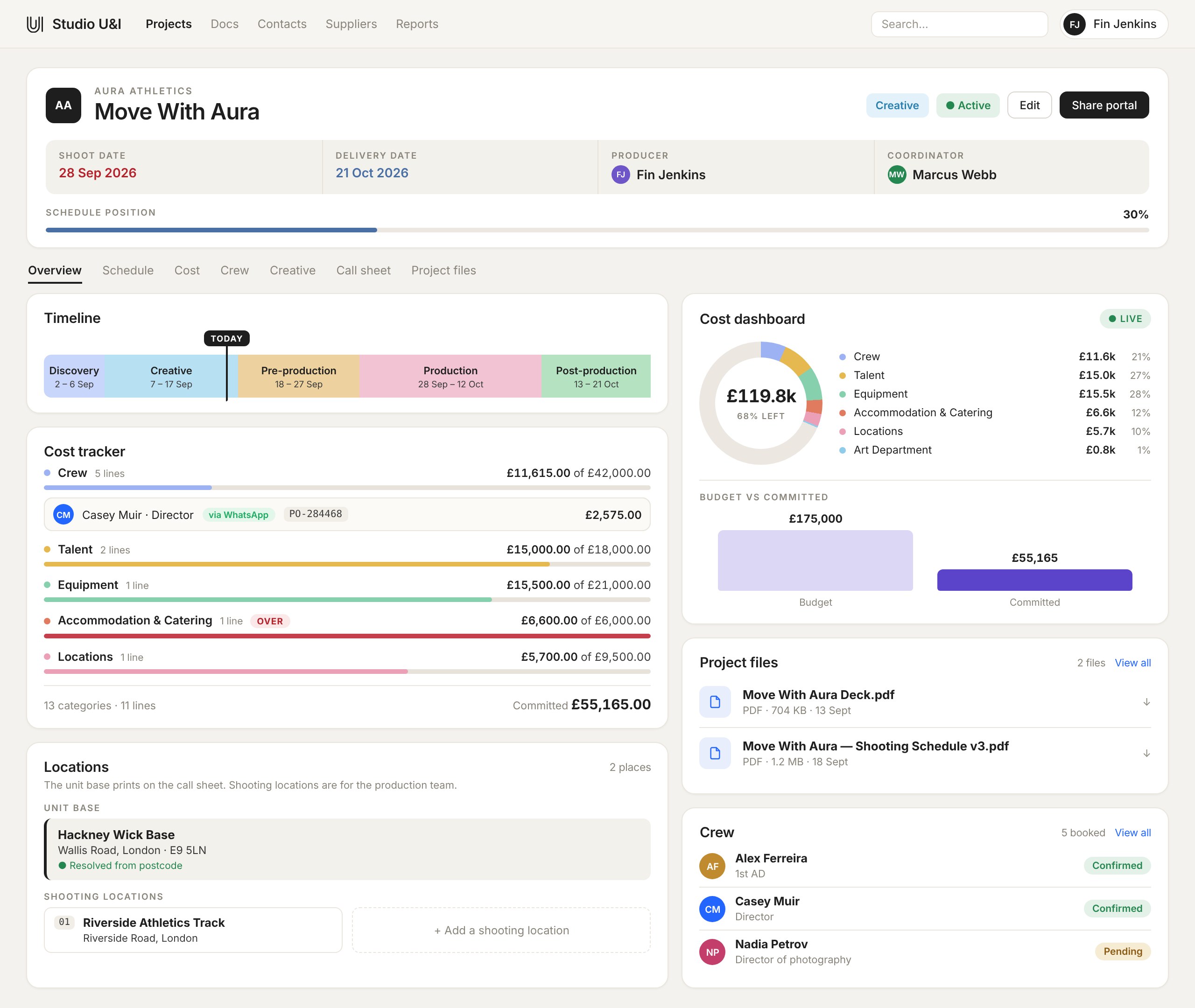
One person runs the shoot, owns the margin and fields the client. This is built for them.
Booked at 21:04. PO landed at 21:04.
Most crew get booked away from a desk. Text the booking to your studio's WhatsApp number, reply YES, and it's done — the line lands in the cost tracker and the freelancer gets their purchase order by email.
- Matches the crew member and the job from a rough message
- Confirms the amount and cost category before anything is written
- Every booking counts as committed spend the moment it's made
Every job. One card.
Every job runs the same five phases, already built. No board to design before you can start, and everyone can see where a job is up to without asking.
Committed is the number to watch.
Budget by category, committed spend against it and what's left — while the job is still running, not six weeks after it wraps. Line items as day rate × days, each with its PO.
- Allocated, committed and remaining, per category
- Add a crew role mid-booking when it isn't on the list
A call sheet nobody has to ask about.
Generated from the job you're already running, in your house style. Paste rough notes and it fills the fields — then shows you everything before anything is saved.
- Shooting location first, nearest A&E from where you shoot
- Sunrise and sunset for the day
- Crew printed in department order
Your producer runs the job. Your client watches it happen.
One read-only place for each client: timeline, brief, storyboard and mood board. It's always current because it's the same system your producer works in.
Notes on running jobs. Follow along.
In-house content teams and video-producing agencies running continuous production.
Not built for broadcast indies delivering to a commissioner, post houses, or anyone whose problem is really accounting. If two specialist tools suit you better, we'll say so.
It's the shape of the work that matters, not the headcount. If this sounds like you, it's worth twenty minutes:
- 01Output is constant, not one job at a time
- 02Several streams run at once — originals, partnerships, campaigns
- 03Someone has to be shown progress without asking for it
- 04Crew is mostly freelance
- 05One person carries a budget they can't see in real time
See it on a job like yours.
Twenty minutes with Finbar. Tell us a little about how you work and we'll come back with a time. Or email finbar@studiouandi.com.
- 1We walk a real job through the five phases
- 2You book a crew member on WhatsApp and watch the PO land
- 3We look at what you run jobs on today, and whether this fits
Thanks — that's with us.
We'll be in touch shortly to find a time.